How To Use InterviewIQ With Teams
If you don't have InterviewIQ installed, Install InterviewIQ
- Join a teams meeting
Important: Use Teams in your web browser (Chrome), not the desktop app - Turn on captions
- Click the three dots (...) in the meeting controls
- Select "Language and speech"
- Find and Click on "Show live captions"
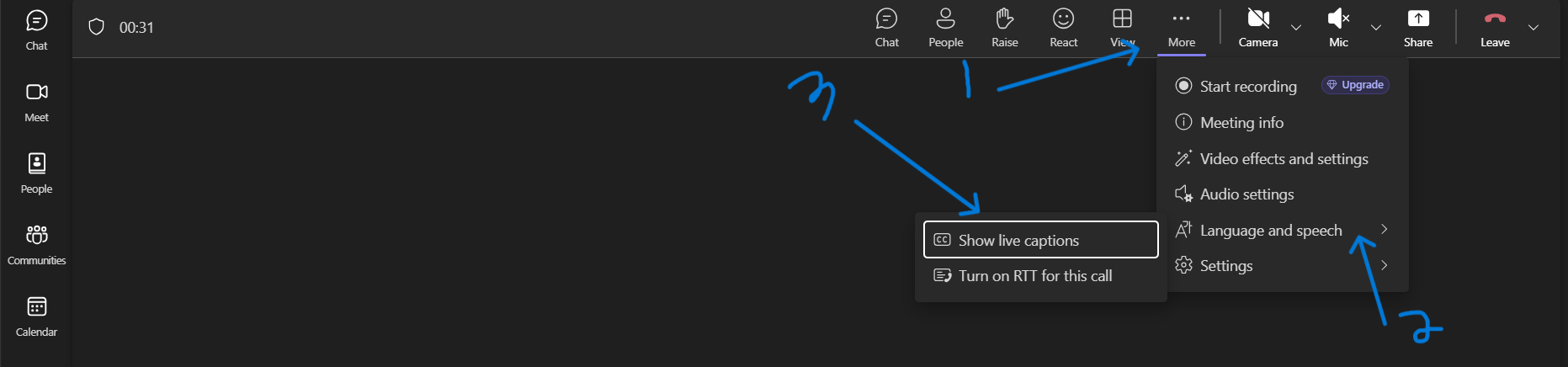
- Once captions are enabled, InterviewIQ will automatically detect questions and show your prepared answers
You're all set! 🎊
Troubleshooting:
- Don't see captions option? Make sure you're using Chrome browser, not the Teams desktop app
- Extension not working? Check that captions are actually appearing on screen
Read more about how to install InterviewIQ